ML: RASA Chatbot: Story Generator
Dialogue Graph
Instead of stories we write cases, each of which has a unique name. Then the script !core_stories_gen.py converts the file with cases into stories.yml. Using cases you can create any acyclic dialogue graphs in a fairly compact form. Cases have syntax similar to stories in RASA. If in stories.yml you replace the section "stories:" with "cases:", and each "- story:" with a unique name case_name: (without the dash), then such a file has the correct syntax for !core_stories_gen.py (steps must be indented or absent).
next Branching
New, compared to stories, is the next section, which performs the role of or branching, but contains as branches pieces of stories and other cases. If the case does not have additional properties such as name, story (see below), then the steps section can be omitted:
cases:                                      # cases section

 case_menu_main:                            # Main menu
   name: Main menu
   steps:
   - intent: want_something                 # 🙎 what do you have?
   - action: utter_menu_main                # 💻 You can choose drinks or pizza
   - next:                                  # then there are three possible dialogue branches:
      - case_menu_drink:                    # 🙎 I want a drink ...
      - case_menu_pizza:                    # 🙎 I want pizza ...
      - case_order:                         # 🙎 I want to know what I ordered ...
   - action: utter_check_order              # 💻 some continuation


 case_pizza_menu:                           # Pizza menu
   - intent: want_pizza                     # 🙎 I want pizza
   - action: utter_menu_pizza               # 💻 By name or by ingredients?
   - next:
      - case_menu_pizza_name:               # 🙎 by name
      - case_menu_pizza_madeof:             # 🙎 by ingredients
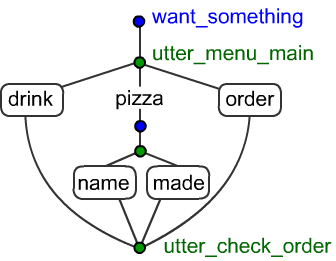
and rectangles are not yet defined cases. If there are also branches in them, then more stories will be obtained.
Due to the fact that in the case case_menu_main after the next branch block there are events (utter_check_order), all branches of such a dialogue converge to one point. If there was nothing after the next block, the history graph would be in the form of a tree.
Nameless Cases
A case can be described in the case section without introducing a unique name for it:
 case_menu_drink:                           # Drink menu
   - intent: want_drink                     # 🙎 I want a drink
   - action: utter_menu_drink               # 💻 We have water, cola, fanta and juices.

   - next:                                  # then two possibilities
      - case:
         - intent: want_juice               # 🙎 juice
         - action: utter_menu_juice         # 💻 We have pineapple, mango,...
      - case:                               # empty (but the branch exists)

   - next:
      - case_want_item:                     # 🙎 I want cola (without quantity)
      - case:
         - intent: want_item                # 🙎 I want two colas (with quantity)
           entities: [NUMBER, ITEM]
   - action: action_add_to_order            # 💻 added five sprites to the order
Insertions Without Branching
Using the insert event you can insert some case at this place:
 case_some_name:
   - intent: intent_A
   ...
   - insert: case_some_name                  # <--- the case will be inserted without parameters
   ...
   - insert:
      - case_some_name: PIZZA                # <--- the case will be inserted with parameters (see below)
   ...
Even if branching is not used, with the help of cases and the insert event,
you can organize stories by allocating frequently repeated pieces into separate cases.
Case Arguments
Cases can be passed a list of control strings, similar to arguments in a function. For example, suppose the case case_want_item should output different pieces of history depending on where it was called from (from the pizza menu, drink menu, etc.)
 case_drink_menu:                          # drink menu
   - intent: want_drink                    # 🙎 I want a drink
   - action: utter_menu_drink              # 💻 We have water, cola, fanta and juices.
   - next:
         - case_want_item: DRINK           # 🙎 I want cola
         - case_juice_menu:                # 🙎 I want juice
The check of control parameters passed to the case
is performed in the if section:
 case_want_item:                           # selected item and possibly quantity
   - intent: some
   ...
   - if:   DRINK
     then:
      - action: utter_drink_count          # 💻 How many bottles of {ITEM}?
   - if:   PIZZA
     then:
      - action: utter_pizza_count          # 💻 How many pieces of pizza {ITEM} do you want?
   - if:                                   # called the case without arguments
     then:
      - action: utter_item_count           # 💻 How many {ITEM} do you want to order?
The case accepts one word or a list of words. All these words must be in
the list of control words coming to the input of the case.
If if is empty, it will trigger only if the input
list is also empty (the last if above).
It is desirable not to use lists of words, as this can lead
to loss of control over the logic (several ifs will trigger).
Case Properties
By default, cases (after inserting other cases into them) become stories for training dialogues in RASA.Using the count: 0 property you can prohibit the case from being an independent story:
 case_want_item:                            # item without quantity
   name:  I want an item                    # case name for story name
   count: 0                                 # the case will not be an independent story
   prob:  0.8                               # can participate in random insertions random
   steps:
   - intent: want_item                      # 🙎 sprite | orange juice
     entities:
      - NUMBER: null
      - ITEM
It is important to remember that a case that does not end with an action usually cannot be an independent story. In the general case count sets the number of repetitions of the story in the training sample (by default count: 1). If with a large number of stories RASA learns some important stories poorly, their number can be increased.
By default, the names of generated stories are formed from the names of the cases participating in them. If it is necessary for similar names to be more readable, the required text is filled in the name field.
Another property prob: 1.0 sets the probability (from 0 to 1) with which this case can be inserted in the random event (by default prob: 0.0). The prob parameters (if any) of all cases are summed and divided by their number (normalized so that their sum is equal to one). If all random cases are equally probable, you can specify prob: 1.0 for them.
Generation Stop
In the list of events, you can also insert the stop operator - stop:. It blocks further construction of the story.
  case_some_name:
    - intent: x
    - action: a
    - next:
        - case:
            - intent: y
            - action: b
            - stop:
         - case:
            - intent: z
    - action: c
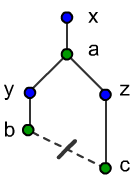
Random Insertions
The random property of a case allows with a given probability to insert a random case from the list of cases that have the prob property at this place in the story:case_some_name: - intent: intent_A - action: action_B - random: 0.8 # random insertion at this place - random: 0.9 # and another one with probability 0.9 - intent: intent_C
Example: Generating Random Insertions
Suppose there are three sequences: (i1,a1,i4,a5); (i2,a2,i4,a6); (i3,a3,i4,a7), in which, depending on the first two steps, the bot should respond differently to the i4 intent. To make the network's life more difficult, before i4 we will insert one or two random insertions of two steps, imitating the stack structure of the dialogue. Basic story cases look like this:
cases:
  case_i1:                  # will create 30 such stories
    count: 30
    steps:
    - intent: i1
    - action: utter_1
    - random: 0.9
    - random: 0.9
    - intent: i4            # i1,a1,i4 -> a5
    - action: utter_5

  case_i2:
    count: 30
    steps:
    - intent: i2
    - action: utter_2
    - random: 0.9
    - random: 0.9
    - intent: i4            # i1,a1,i4 -> a5
    - action: utter_6

  case_i3:
    count: 30
    steps:
    - intent: i3
    - action: utter_3
    - random: 0.9
    - random: 0.9
    - intent: i4            # i1,a1,i4 -> a5
    - action: utter_7
Additionally, it is necessary to create a sufficient number of stories that will serve as insertions:
  case_rnd1:
    count: 0
    prob:  1.0
    steps:
    - intent: i5
    - action: utter_8

  case_rnd2:
    count: 0
    prob:  1.0
    steps:
    - intent: i6
    - action: utter_5
...
As a result of running !core_stories_gen.py 90
stories of various lengths will be obtained. RASA quite copes with identifying the required pattern (even if the number of random events is increased).
You can check this by running the generator again and passing the resulting file through !agent_test.py,
paying attention to last error (of course, RASA can make mistakes on unfamiliar random insertions).
Dialogue Structure
Example of a dialogue stack (dialogue stack):
💻 That will be $15 from you. Can I charge your card?               -|
🙎 Is there any credit left on my account from the compensation received?   -|
💻 Yes, there are 10 dollars on your account.
🙎 Great.                                                     -|
💻 Can I place the order?
🙎 Yes.
💻 Done. Tomorrow you should have your things.                       -|
Transformers
