ML: RASA NLU Pipeline
Introduction
This document continues the description of the RASA engine for building chatbots. The pipeline of components for the NLU module is discussed in detail. Proper specification of these components and their parameters improves classification quality.
In the file config.yml, in the pipeline section (pipeline) a sequence of execution of various components (classes) is listed, which build feature vectors, classify intents (intent) and extract entities (entity) from them. The output of each component can be used by any other component that comes after it in the pipeline. All components are trained and processed in the order they are listed in the pipeline.

- Tokenizer - splits text into individual words (tokens).
- Featurizers - form feature vectors
- Intent Classifiers - classify intents
- Entity Extractors - extract entities from intents
For example, the simplest pipeline can look like this (DIETClassifier combines the last two tasks):
pipeline:                              # config.yml
   - name: WhitespaceTokenizer         # splits text into tokens

   - name: CountVectorsFeaturizer      # features as "bag of words"
   - name: CountVectorsFeaturizer      # features as N-grams
     analyzer: char_wb                 # letters
     min_ngram: 1                      # from one
     max_ngram: 4                      # up to four pieces

   - name: DIETClassifier              # classifier for intents and entities
     epochs: 100                       # trains for 100 epochs
     constrain_similarities: true
Tokenizer
Tokenizers (tokenizer) - splits text into words (tokens). This is the starting task of the NLU pipeline, which always goes first. By default, this is done by the component WhitespaceTokenizer:
   - name: WhitespaceTokenizer
     case_sensitive: False              # can be converted to lowercase
WhitespaceTokenizer
removes all punctuation marks (except periods and commas in numbers) and cleans the text from emojis,
correctly handling urls and e-mails (in the second line tokens are split by a vertical bar):
text:   "Yes,this costs 10,000.00$ :) info@google.com http://google.com  (067)565-18-18?"
tokens: |Yes,this|costs|10,000.00|info@google.com|http://google.com|(067)565-18-18|
It is evident that it incorrectly tokenizes words merged with punctuation "Yes,this" and discards the question mark, which may be significant for intent classification (a person asked a question). If you use the tokenizer SpacyTokenizer instead, the result will be different:
tokens: |yes|,|this|costs|10,000.00|$|:)|info@google.com|http://google.com|(|067)565|-|18|-|18|?|
It correctly splits tokens merged with punctuation, preserves punctuation, but incorrectly tokenizes the phone number. Additionally, SpacyTokenizer generates lemmas of tokens (replaces "likes" with "like", etc.), which can later be used in CountVectorsFeaturizer.
As with any other pipeline component, you can write your own tokenizer class if desired.
Featurizers
The feature vector (features) obtained from the text then goes to the input of the neural network, which learns to correctly assign the text to one of the intents (intent). There are two types of features:
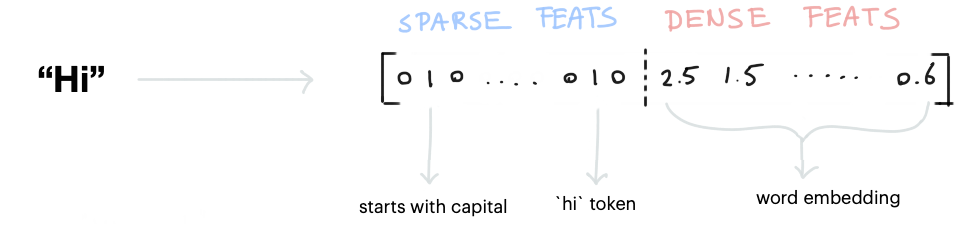
- Sparse Features (sparse features) - consist of an array of zeros and ones, in which, usually, there are significantly fewer ones. One means the presence of a certain feature, and zero means its absence. Such features, for example, are created using CountVectorsFeaturizer (bag of words and n-grams) and LexicalSyntacticFeaturizer (its features are a token at the beginning of the text, at the end of the text, etc.).
- Dense Features (dense features) - this is a vector (array) with real-valued components. Usually this is embedding (word2vec) technology. To make dense features work, you need to use SpaCyFeaturizers for the corresponding language.
All sparse and dense features are combined into a single feature vector that characterizes the given token:
In addition to the set of feature vectors for each token, a feature vector for the entire sentence is also built, which is called CLS:

RASA allows you to create your own components for building feature vectors, which can "contribute" to the overall feature vector of the pipeline.
Intent Classifiers
After building feature vectors, RASA performs intent classification. The universal classifier DIETClassifier uses both token vectors and the CLS vector of the entire sentence. At the same time, it simultaneously classifies the intent and extracts entities from it:
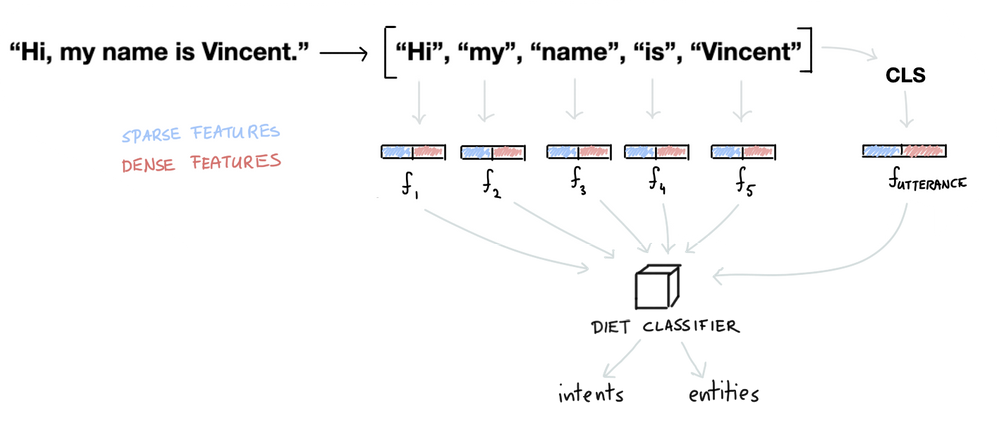
"Inside" DIETClassifier there is a rather complex neural network that uses the Transformer architecture.
Entity Extractors
Some, especially template entities, are better extracted not using DIETClassifier, but with specialized components such as RegexEntityExtractor. Such entities include numbers, phone numbers, email addresses, etc. Therefore, the pipeline usually uses several components for entity extraction:
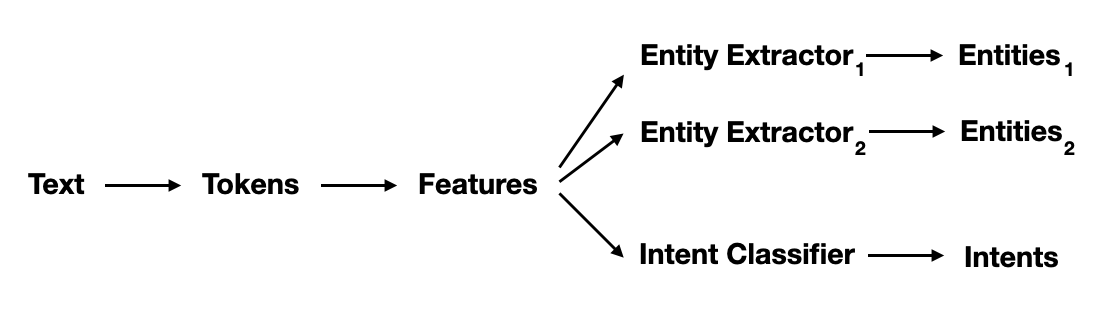
Each of them can extract different parts of the input text.
Pipeline in Action
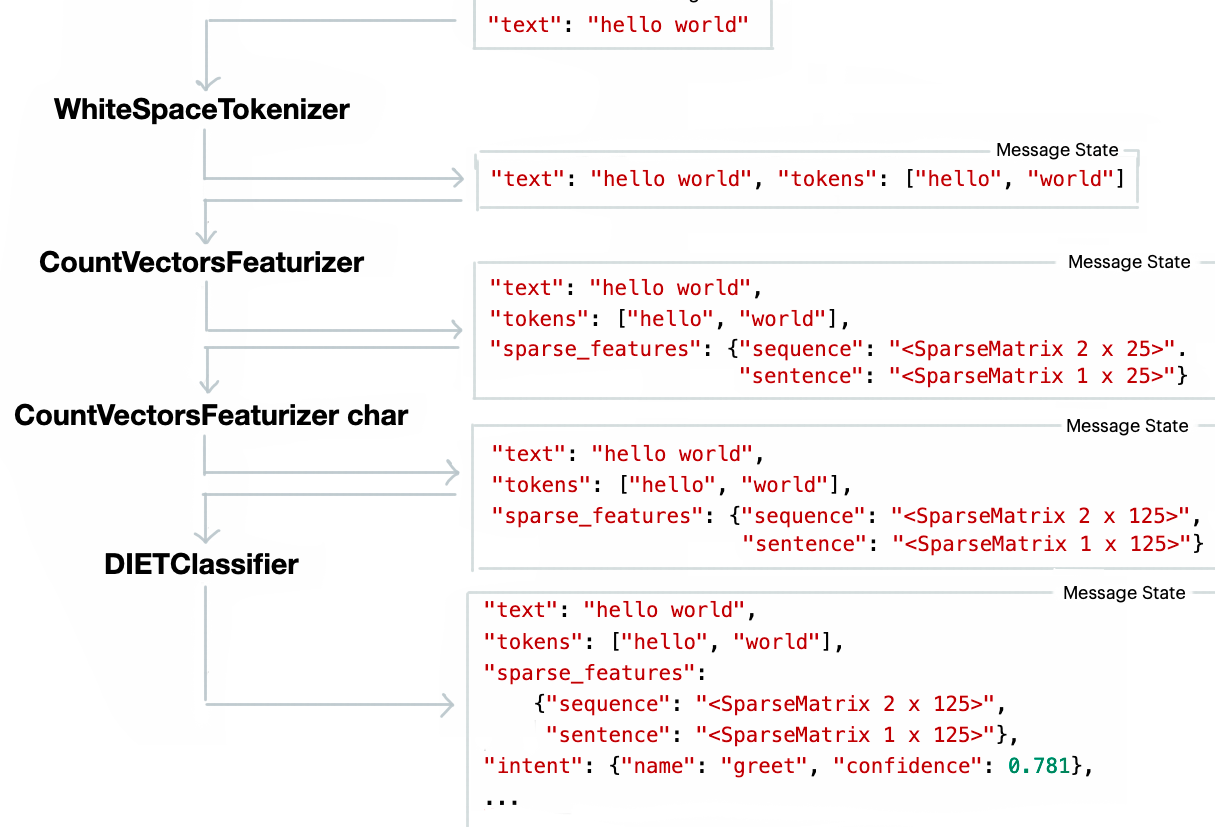
Here is an example of the sequential operation of various pipeline components:
Useful Information
