ML: RASA Chatbot: Stories and Rules
Introduction
Stories in the RASA framework are examples of dialogues on which a rather complex neural network is trained. Like any training, it is magic. A story consists of a list of numbered "tokens" from a fixed "dictionary", consisting of the user's intents (intent) and the bot's actions (action). For example, if the intents greet and goodbye have numbers 1 and 2, and the responses utter_greet and utter_goodbye have numbers 3 and 4, then the story
- story: hello and goodbye                 # data/stories.yml
  steps:
  - intent: greet                          # 🙎 hello
  - action: utter_greet                    # 💻 Hello, glad to meet you
  - intent: goodbye                        # 🙎 see you tomorrow
  - action: utter_goodbye                  # 💻 See you soon!
is the sequence 1,3,2,4. The task of the RASA neural network is to learn from input 1,3,2 to output the next number (response) 4 at the output. During training, stories of various lengths are used and RASA learns to predict any response in a given sequence. In the example above, this is also 1 -> 3. In reality, the situation is a bit trickier. Each story step (above 1, 2 etc.) additionally includes a list of entity names extracted from this intent (without their values) and the current values of all slots. All these components are turned into a vector of real numbers. A story is a sequence of such vectors, on which the neural network learns to predict the bot's next reaction.
Since the neural network uses an attention mechanism, in long training sequences quite non-trivial patterns of dialogue can be "caught". However, as already mentioned above, RASA is a large magical black box, so the result can be unpredictable. In any case, the more stories there are, the better usually, and it is good if more probable continuations occur more often than less probable ones. Let us recall that it is necessary to monitor the errors of neural network training (the last progress bar in kernel training). If the accuracy (acc) is noticeably less than 1, and the error (t_loss) is greater than 0.5, you should increase the number of epochs epochs in the TEDPolicy section of the config.yml file.
Branching
To create a large number of training stories, various mechanisms exist in RASA. The simplest is the logical OR block (or), which allows describing several variants of the user's intents in one story at once:
stories:                                    # data/stories.yml
- story: newsletter signup with OR
  steps:                                    # chain of story steps:
  - intent: signup_newsletter               # 🙎 I want to subscribe to the newsletter
  - action: utter_ask_confirm_signup        # 💻 Are you sure you want this?
  - or:                                     # then one of these intents:
    - intent: affirm                        # 🙎 yes, exactly
    - intent: thanks                        # 🙎 thank you
  - action: action_signup_newsletter        # 💻 I am subscribing you
Such a story will result in two similar stories. In one there will be intent: affirm,
and in the second - intent: thanks.
Unfortunately, only the intent (intent) can be placed in the or section.
Merges
Frequently repeated pieces of stories can be separated into separate "mini-stories", "merging" them with each other using the checkpoint property, after which any name follows (merge name):
stories:                                    # data/stories.yml
- story: beginning of conversation
  steps:
  - intent: goodbye
  - action: utter_goodbye
  - checkpoint: ask_feedback                # this story can be continued

- story: user provides feedback
  steps:
  - checkpoint: ask_feedback                # for example, with this story
  - action: utter_ask_feedback
  - intent: inform
  - action: utter_thank_you
In this case RASA will create one long story by "merging" these two pieces at the checkpoint point. If you add several more pieces with the same checkpoint at the beginning or end, you will get stories with all possible merges. It should be remembered that active use of checkpoint can uncontrollably generate a lot of stories and increase training time. In addition, such "transitions" between stories can be difficult to track, which leads to logical errors.
Ending with Continuation
Instead of merges, in some cases another mechanism turns out to be effective. Let's split a long story into pieces so that one piece ends with some action, and another starts with the same action. Suppose, for example, that after the question "Can I help you?" there can be two answers ("yes" and "no"). Then such branching can be formatted as three stories:
- story: 1
  steps:
  ...
  - action: utter_can_i_help

- story: 2                         |       - story: 3
  steps:                           |         steps:
  - action: utter_can_i_help       |         - action: utter_can_i_help
  - intent: yes                    |         - intent: no
  - action: utter_2                |         - action: utter_3
  ...                              |         ...
According to the first story RASA learns to predict the response utter_can_i_help, the second and third teach the sequences: (utter_can_i_help, yes, utter_2) and (utter_can_i_help, no, utter_3). In each of such pieces there must be at least one intent (intent).
☝ If branching and merging are actively used when composing a story, it makes sense to move from stories to cases, allowing stories and their branches to be written in a more structured way.
Composition of a Story Step
Each story consists of steps. Conventionally, there are intent steps (in which, in addition to intent there is the service action action_listen - listening to the person) and action steps, consisting of the bot's action and the last person's intent. If several action go one after another in the story, the last intent is also added to each such step, which is above.
Any story step contains the values of all slots. This is an important component of the feature vector that characterizes this step. If when describing training stories the slot values are not written, then this makes correct prediction difficult, since in a real dialogue the slots will be filled in some way. If such a combination was not taken into account in the stories, this step will be different from the "reference" story step. Naturally, the network at each step takes into account the person's intent and the bot's action as well, so it may cope with an "incorrect" slot vector. But it is still worth making its life easier.
The slot_was_set story section is used to describe slot values. By listing slot values in it, we tell RASA that in this place they most likely have these values, which is important for choosing the next action:
stories:
- story: story with a slot
  steps:
  - intent: celebrate_bot
  - slot_was_set:                           # by this moment the slots have values:
    - NAME                                  # text NAME is somehow filled != null
    - AGE: 16                               # float AGE equals 16
    - FEEDBACK: positive                    # categorical FEEDBACK equals positive
  - action: utter_yay                       # then the response utter_yay should follow
We emphasize that in slot_was_set not only those slots
that changed their value at this step are listed, but also all slots affecting the dialogue (having the property influence_conversation: true).
However, if in the framework of this story the slot was set and does not change further,
it does not need to be repeated in slot_was_set.
At the same time (with some reservation, see below) undefined slots (null) do not need to be listed,
since by default their vector is filled with zeros.
If during training the neural network sees only examples with the same slot value, then it stops reacting to it. Therefore, it is desirable to provide counter-examples in which the slot is not defined or has different values.
In addition to slot values, the step uses a list of entities extracted from the intent, which also need to be listed in the entities property of this intent:
stories:
- story: story with entities
  steps:
  - intent: account_balance                 # from the account_balance intent
    entities:                               # the entity was extracted
    - ACCOUNT_TYPE: credit                  # with name ACCOUNT_TYPE and value credit
  - action: action_credit_account_balance   # then the script will be called
If such extraction did not occur, this story will not be a training example
for the purpose of predicting the action action_credit_account_balance
(which is formatted as Python code).
If the slot name and entity name match, then after entities
it is not necessary to list the values of these slots in slot_was_set (they will get there automatically).
How Slots Affect the Story
When specifying slot values in slot_was_set or entities, it is very important to take their type into account.
✒ The value of a text slot (text) does not matter and only the fact that something was written to it (or not) is taken into account. Therefore, in the "step vector" a text slot is equal to [1.0] (value is set) or [0.0] (not set). Below the first three variants will give the same result (unlike the last one, where the slot is not defined):
- slot_was_set:    |   - slot_was_set:    |   - slot_was_set:    |   - slot_was_set:
  - NAME           |     - NAME: masha    |     - NAME: sasha    |     - NAME: null
✒ If concretization of the value is needed, categorical slots (categorical) should be used.
For them, three situations are distinguished:
- a specific (predefined) value is set;
- it contains "garbage" (not matching any of the allowed values);
- the value is not set (null).
✒ A floating-point slot (float) in which max_value is not set behaves like a text slot, i.e. its value does not matter and the cases "it exists" or "it does not exist" (null) are distinguished, and the value in the feature vector is always equal to 1.0. If max_value and min_value are present (if the latter is missing, it is 0), the slot value is normalized to the range [0...1]. For example, if max_value: 1000 is set and the value is 16, then the slot vector will consist of two components [1.0, 0.016] (the first is set or not). If for a numeric slot in entities you do not specify a value, it is interpreted as null. When a specific value is specified (AGE: 16), then exactly this value will get into the slot vector. If in a real dialogue a different value is entered, then the slot vector of the step will differ from the reference vector of the story step.
Note that with a large max_value, close slot values for the network turn out to be poorly distinguishable. Therefore, the float type makes sense to use only for a narrow range or with a large spread of values. For example, in a story interesting for young people we write 16, and for older people - 70. In a real dialogue, when entering 12 or 20, a "youth continuation" of the story will most likely work, and with large values - an "older continuation".
A few more general remarks:
- If the value of a slot of any type is specified at this step (in entities or slot_was_set), then it will be automatically added to the slot vectors of all subsequent steps of the story until it "receives" the value null. If the slot is reset to null or changes value in a custom action, this must be explicitly indicated (during training RASA does not know about this).
- Regardless of slot values (even if null is set!) in the entities section, their list gets into the entity vector. These values (including null) will affect the formed list of slot values (with auto_fill: true set). In particular, if the entity has null, then zero components will get into the slot vector. But it is better not to use null in the entities section, resetting slots to null using slot_was_set.
- It is not worth setting initial_value: DEFAULT_VALUE for slots that affect the story (in the slots section in the file domain.yml). In this case they are added to the beginning of all stories (which may work not at the beginning of the dialogue) and what is worse, they are also added to rules. The latter kills the work of chitchat (see below), if the slot has a different value at this step.
- It is not worth putting slot_was_set before the intent unless necessary, as then it gets into the previous story step. In particular, this also applies to the beginning of the story, where it turns into a step containing only the slot vector.
Rules
Rules contain templates for short pieces of dialogue that should always follow the same path. They are usually used if some messages do not require any context and the answer should be fixed. Rules can include only one user intent (intent), after which one or more bot responses (action) follow. It is not worth abusing rules, as they are the "untrainable" part of stories. For rules to work, in config.yml you need to specify:
policies:                                   # config.yml
- name: RulePolicy
If the policies section is completely empty, this does not need to be done, because in this case the default policies will be enabled, which include RulePolicy.
Suppose it is necessary that at the beginning of the dialogue (and only at the beginning) a greeting is triggered. Then the rule is set with the property conversation_start:
rules:                                      # data/rules.yml
- rule: Rule 1> we respond to greeting at the beginning of the dialogue:
  conversation_start: true
  steps:
  - intent: greet                           # 🙎 hello
  - action: utter_greet                     # 💻 Glad to meet you!
Repeated greeting greet inside the dialogue will not trigger this rule. Now the greeting can be not added to the story examples, as it is embedded in the "reflexive response" in the form of a rule. Moreover, if such a piece is not in the stories, then after RulePolicy predicts the response utter_greet, the neural network trained on stories (TEDPolicy) will make predictions as if greet, utter_greet had not occurred!
Conditions in Rules
In the condition blocks of the rule, you can list the conditions for the rule to trigger. For example, suppose it is necessary for the rule to trigger only if the slot PERSON was set ever earlier and has not been reset to null by the current moment. Then this must be indicated in the slot_was_set section:
rules:
- rule: Rule 2> We say 'See you soon PERSON' if the person reported their name
  condition:
  - slot_was_set:                           # the rule will trigger if
    - PERSON                                # the PERSON slot is set to any value
  steps:
  - intent: goodbye                         # 🙎 goodbye
  - action: utter_goodbye_PERSON            # 💻 See you soon Nastya

- rule: Rule 3> We say 'See you soon' if the person did not report their name
  condition:
  - slot_was_set:                           # the rule will trigger if
    - PERSON: null                          # the PERSON slot was not set
  steps:
  - intent: goodbye                         # 🙎 goodbye
  - action: utter_goodbye                   # 💻 See you soon
Now farewell, like greeting, can be removed from the stories.
However, the rule may not trigger if in the dialogue there are non-zero slot values
that are not taken into account in the steps of these rules.
By default, after completing the last step of the rule, the bot will wait for the next message from the user. To cancel this, you need to change the wait_for_user_input property:
- rule: Rule which will not wait for user message once it was applied
  steps:
  - intent: greet
  - action: utter_greet
  wait_for_user_input: false                # do not wait for the user
This indicates that the bot should perform another action before waiting for additional actions from the user.
Contradictions in Rules
Using rules can lead to messages about contradictions: "contradicting with rule(s)". For example, this will happen if you add one more rule to the rules of the previous section, in which the slot PERSON is checked for the specific value "Nastya":
- rule: Rule 4> We say 'Hello, glad to meet you' if this is Nastya
  condition:
  - slot_was_set:                           # the rule will trigger if
    - PERSON: Nastya                        # the PERSON slot is set to nastya (incorrect!)
  steps:
  - intent: goodbye                         # 🙎 goodbye
  - action: utter_greet                     # 💻 Hello, glad to meet you
If PERSON is a text slot then checking for "Nastya" is actually not performed, but only the fact of its filling is checked , which is equivalent to rule 2, but with a different ending.
The same problem arises if there is a story and a rule that end differently:
stories:                                    # data/stories.yml
- story: hello and goodbye
  steps:
  - intent: greet
  - action: utter_goodbye

rules:                                      # data/rules.yml
- rule:  greeting for greeting
  steps:
  - intent: greet
  - action: utter_greet
Thus, it is better to format short reactions to a person's actions (for example: "What time is it now?" or "Goodbye") with rules, which do not occur in stories.
Happy and Unhappy Stories
A happy story describes a situation where the user behaves as expected, i.e. does what is "supposed" to be done. For example, when ordering pizza, they choose its name, size and quantity, without deviating to arbitrary questions and without jumping back with phrases like "oh no, I'll take a large one anyway". All other stories are unhappy (for the bot developer). However, their development also needs to be provided for, trying to return the conversation to the required direction.
The probability of an unhappy dialogue can be reduced by proper design of the questions asked by the bot. They should not be too general, like "How can I help you?". On the contrary, it is necessary to prompt the user what they should do next: "You can choose pizza or drinks".
RASA can make mistakes (both in the NLU module and in the core), therefore, with low reliability of intent recognition or event prediction it is necessary to provide for reformulation of the bot's question, its concretization. If this process is repeated, it is necessary to "roll back" significantly back and start all over again. The simplest way to deal with unhappy stories is to develop responses to chitchat and FAQ questions.
Chitchat and FAQ
Often a person asks stereotypical questions, for example, to test the limits of the bot's capabilities: "are you a bot?", do you like your job? etc. In RASA such chitchat is called chitchat. In addition to such questions, there may be short questions on the topic, which are called faq (frequently asked questions). For chitchat or faq intents the bot should respond uniformly, regardless of what happened earlier in the dialogue, but at the same time taking into account the "topic" of the intent. To handle these situations, ResponseSelector must be added to the pipeline:
pipeline:                                   # config.yml
# ...
- name: ResponseSelector
  epochs: 200                               # how many epochs for training
  retrieval_intent: chitchat                # chitchat topics

- name: ResponseSelector
  epochs: 200
  retrieval_intent: faq                     # FAQ questions
Then, in the policies config.yml we enable rule processing (RulePolicy) and add the following two rules:
rules:                                      # data/rules.yml
  - rule: responses to chitchat
    steps:
    - intent: chitchat                      # 🙎 something from chitchat intents
    - action: utter_chitchat                # 💻 response to this question

  - rule: responses to FAQ questions
    steps:
    - intent: faq                           # 🙎 something from faq intents
    - action: utter_faq                     # 💻 response to this question
In the intents it is necessary to create a sufficient number of examples for
identification of chitchat and FAQ. Names of such intents begin with chitchat,
then comes a slash and clarification of the chitchat topic, which will be used in responses
(these intents should be collected in a separate file in the data folder).
nlu:                                        # data/nlu_chitchat.yml
  - intent: chitchat/ask_name
    examples: |
      - What is your name?
      - Can I know your name?

  - intent: chitchat/ask_weather
    examples: |
      - What weather do you like?
      - Do you like it when it's hot?
Chitchat topics are called sub-intents (sub-intents).
In the list of intents it is necessary to list only what comes before the slash:
intents:                                    # domain.yml
- chitchat                                  # all chitchat/... intents
- faq                                       # all faq/... intents
and in the file domain.yml specific responses to known questions are prescribed.
responses:                                  # domain.yml
  utter_chitchat/ask_name:
  - text: "My name is Smart-bot"
  - text: "This morning I was called Smart-bot"

  utter_chitchat/ask_weather:
  - text: I don't care what the weather is.
Out of Bot's Knowledge
Another way to combat deviation from a happy story is to create an intent in which examples are listed with a wide variety of questions and statements, for which a general response is given like "Sorry, but let's get back to our main goal."
nlu:                                        # data/nlu_out_of_scope.yml
- intent: out_of_scope
  examples: |
    - Why are girls needed?
    - Who invented the computer?
    - Do you need to brush your teeth?
    - Why don't fish fly?
    - dlyofvschfrt
#   ...
As usual, we add out_of_scope to the intents section
of the domain.yml file
and prescribe the corresponding response:
responses:                                  # domain.yml
  utter_out_of_scope:
  - text: Sorry, but it's better for us not to be distracted from our goal.
We also place the processing of this intent in rules:
rules:                                      # data/rules.yml
- rule: intent is outside the bot's knowledge
  steps:
  - intent: out_of_scope                    # 🙎 I'm talking some nonsense
  - action: utter_out_of_scope              # 💻 It's better for us not to be distracted from our goal.
  - action: utter_main_menu_again           # 💻 What will you order, pizza or drinks?
Uncertainty in Intents
When recognizing the user's intents, NLU RASA calculates the level of confidence (confidence) of each intent, choosing the maximum. This number is in the range from 0 to 1, where one corresponds to absolute confidence. If the intent is recognized with low confidence (nlu fallback), it is better to handle it with the response utter_fallback like "I didn't understand you. Try to repeat in other words." For this, add it to the responses section of the domain.yml file, and in config.yml in the pipeline we prescribe:
pipeline:                                   # config.yml
# ...
- name: FallbackClassifier                  # confidence threshold
  threshold: 0.7
The FallbackClassifier classifier handles incoming messages with low confidence. The nlu_fallback intent will be called when all other intent predictions fall below the configured confidence threshold threshold. After that, the utter_fallback response will be called, if defined in rules:
- rule: when all intents have confidence below threshold (see config.yml)
  steps:
  - intent: nlu_fallback
  - action: utter_fallback                  # 💻 I didn't understand you. Formulate it differently.
  - action: utter_main_menu_again           # 💻 Make your next choice
Uncertainty in Dialogue
Another source of bot uncertainty is low confidence in predicting the next response (core fallback). To handle this problem, the following must be added to the RulePolicy policy:
policies:                                   # config.yml
# ....
- name: RulePolicy
  core_fallback_threshold:    0.4
  core_fallback_action_name:  action_default_fallback
  enable_fallback_prediction: true
If the confidence of predicting the continuation of the story is below the core_fallback_threshold threshold, the built-in action action_default_fallback will be called, which will send the utter_default response (it must be prescribed in responses) and return to the state of the conversation before the user message that caused the rollback. Therefore, this will not affect the prediction of future actions.
If desired, the standard action action_default_fallback can be redefined, by writing the corresponding Python script.
Two-Stage Fallback Mode
Two-Stage Fallback mode is enabled when a person's message is classified with low confidence. Then the person is asked to confirm their intent. If they confirm, the dialogue continues. If not, the person is asked (utter_ask_rephrase) to rephrase their message. If the new intent is classified with high confidence, the dialogue continues as if the first "bad" intent had not been there. If the new intent is also classified with low confidence, the person is asked again to confirm this intent. If they confirm, the dialogue continues, and if not, action_default_fallback is triggered, which sends utter_default and the dialogue continues as if both unrecognized intents had not been there.
As with uncertainty in intents, in config.yml we add FallbackClassifier and create a pair of suitable responses:
responses:                                  # domain.yml
  utter_ask_rephrase:
  - text: I'm sorry, I didn't quite understand that. Could you rephrase?

  utter_default:
  - text: I'm sorry, I can't help you.
Then we add the following rule (enabling RulePolicy in policies):
rules:
- rule: Implementation of the Two-Stage-Fallback
  steps:
  - intent:      nlu_fallback
  - action:      action_two_stage_fallback
  - active_loop: action_two_stage_fallback
Handoff to Human
Human Handoff - see documentation.TEDPolicy
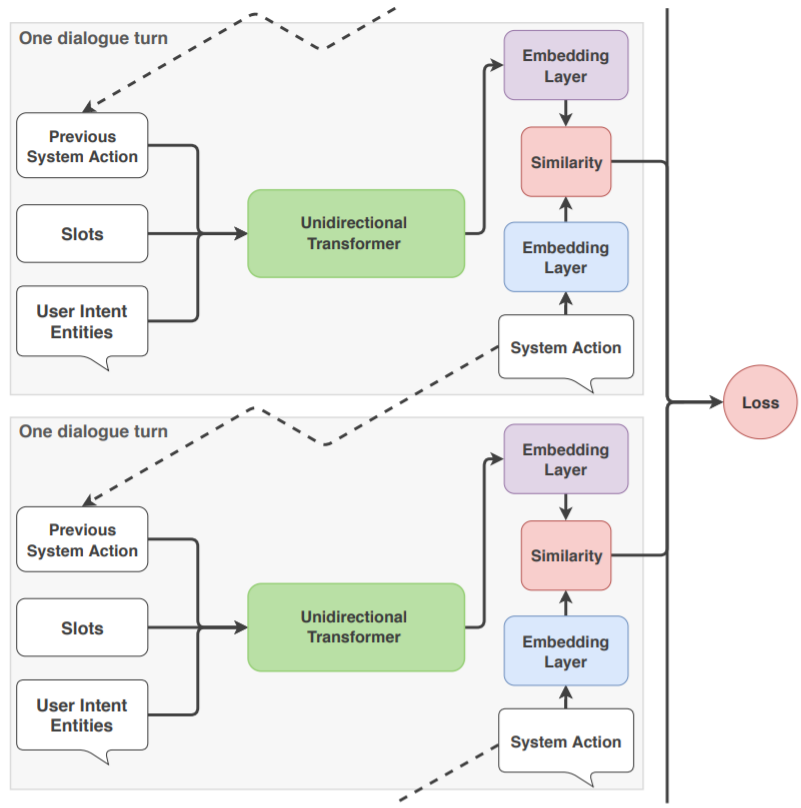 The neural network predicting the continuation
of the dialogue is called TED (Transformer Embedding Dialogue).
The neural network predicting the continuation
of the dialogue is called TED (Transformer Embedding Dialogue).
More detailed information about its architecture can be found in the article
arXiv:1910.00486.
Briefly, the situation looks as follows. Each event (step)
in the dialogue (action and intent)
is accompanied by a list of slots and extracted entities.
At the same time:
Therefore TED, while training, takes into account only those slots that are indicated in the slot_was_set section. During prediction, the values of all slots (already set) are taken into account.
If it is clear that the Python script changed some slots, it is better to indicate this in the stories (RASA itself issues a corresponding warning when launching). In general, the more information we provide during training, the better. On the training settings for TED are done in the file config.yml:
policies:                                   # config.yml
- name: TEDPolicy
  epochs: 200                               # how many training epochs
  max_history: 8                            # by how many events in the dialogue the forecast
The max_history property is the number of story steps that is taken into account for the forecast. The smaller max_history, the easier it may be to train RASA. However, max_history should be limited so that the model has enough previous dialogue turns to make a correct forecast. You can also change the parameters of the neural network: number_of_transformer_layers, transformer_size etc., a description of which can be found in the documentation. General advice: while everything works, it is better not to change the TEDPolicy parameters (except for the number of training epochs epochs and history depth max_history).
MemoizationPolicy
A well-trained neural network with the correct architecture should, if possible, not only "remember" training examples, but also be able to make adequate predictions in unfamiliar situations based on them. However, even the most remarkable network may not remember all the training data. Therefore, in RASA there is a mechanism that allows storing stories outside the neural network. For this, in config.yml it is necessary to specify:
policies:                                   # config.yml
  - name: MemoizationPolicy
    max_history: 3                          # length of the remembered sequence
In this case RASA will remember all pieces of stories of length 3 (by default max_history: 5).
If such a sequence occurs in the current dialogue, RASA
will predict the next response with unit confidence.
If such a sequence is not found in the examples,
the TEDPolicy neural network is launched.
At the same time, at each step not only action, intent,
but also the list of extracted entities and the values of all slots must match.
Suppose a story in the file stories.yml consists of six steps (i1,a1,i2,a2,i3,a3), where iX is the intent, and aX is the action and max_history: 3. Then six pieces will get into memory (after the colon is the prediction of the action and AL = action_listen - system action of waiting for a message):
(i1:  a1)
(i1,a1:  aL)
(i1,a1,i2:  a2)
(a1,i2,a2:  aL)
(i2,a2,i3:  a3)
(a2,i3,a3:  aL)
"Shortened pieces" (the first two above) will be used only at the beginning of the dialogue.
In its middle, max_history steps are always counted back and if they
are in memory, MemoizationPolicy will trigger.
Suppose for the example above with one story, the dialogue consists of two of its repetitions:
i1,a1,i2,a2,i3,a3, i1,a1,i2,a2,i3,a3.
At the beginning, after each intent MemoizationPolicy will trigger
to predict the next action (three times).
However, at the beginning of the story repetition (the second i1),
the memory policy for a1 will not trigger (there will be TEDPolicy), because there is no sequence
(i3,a3,i1) in memory.
Then (after i2) MemoizationPolicy for a2 will work again,
since the corresponding piece (i1,a1,i2) of length max_history: 3 is in memory.
Thus, it is worth striving for short memory (small max_history), but so as not to lose important "plot twists" for decision making. It should be taken into account that short stories with steps less than max_history will not lead to the triggering of MemoizationPolicy in the middle of the dialogue. In the example above, if you set max_history: 7 (more than the number of steps in the story), the memory policy will trigger only on the first three intents (at the beginning of the dialogue), and then stop working (there is not a single piece of memory from 7 steps).
The max_history parameter in the TED neural network. should also not be chosen larger than necessary for correct prediction. Otherwise, a long and "unnecessary" story will complicate training and reduce prediction reliability.
The AugmentedMemoizationPolicy policy works similarly to MemoizationPolicy. Additionally, it tries to discard slots that do not affect the filled piece. If these slots are set in other stories or scripts, such "easing" of life may complicate it.
Thus, when choosing the next response, the rule triggering is analyzed first (RulePolicy), then the presence of remembered stories (MemoizationPolicy), and only after that the neural network is launched (TEDPolicy):
6 - RulePolicy (rules have the highest priority)
3 - MemoizationPolicy or AugmentedMemoizationPolicy (memory comes next)
1 - TEDPolicy  (the neural network has the lowest priority)
In any case, it is necessary to experiment and write many happy and not so happy stories.
Step Analysis
To understand the composition of steps coming to the input of TEDPolicy, it is useful
to analyze them in remembered stories of MemoizationPolicy.
They are located in the model archive and the script !memory.py is used for their unpacking.
Suppose in MemoizationPolicy max_history:7 is set and there is only one story of eight steps:
- story: hello, I want two colas
  steps:
  - intent: greet                           # 🙎  hello
  - action: utter_what_is_your_name         # 💻  Hello, what is your name?
  - intent: my_name+my_age                  # 🙎  Masha, 16 years old
    entities:
    - NAME                                  # slot NAME type:text
    - AGE: 16                               # slot AGE type:float, max_value:1000.0
  - action: utter_glad_to_meet_you_name     # 💻  Glad to meet you, Masha. How is life?
  - intent: my_life                         # 🙎  good
    entities: [ ADJ: good ]                 # slot AGE=(good,bad) type:categorical
  - action: utter_what_do_you_want          # 💻 What do you want?
  - intent: want_item                       # 🙎  I want cola
    entities: [ITEM]                        # slot ITEM   type:text
  - slot_was_set: [ AGE: null ]             # reset the AGE slot for experiment
  - action: utter_good_choice               # 💻  Great choice, Masha!
Running !memory.py will output eight saved pieces. The shortest memory consists of one step, predicting the response utter_what_is_your_name at the beginning of the story:
- memo_1:
  - action:  action_listen
  - intent:  greet

  - predict: utter_what_is_your_name
Intents are always accompanied by the action action_listen, and bot action steps repeat the last intent (both are omitted below). One of the two longest pieces of memory of seven steps (max_history:7 ) contains the entire story (steps are separated by empty lines):
- memo_8:
  - intent:  greet

  - action:  utter_what_is_your_name

  - intent:  my_namemy_age
    entities:['AGE', 'NAME']
  - slots:   {'AGE': [1.0, 0.016], 'NAME': [1.0]}

  - action:  utter_glad_to_meet_you_name
  - slots:   {'AGE': [1.0, 0.016], 'NAME': [1.0]}

  - intent:  my_life
    entities:['ADJ']
  - slots:   {'ADJ': [1.0, 0.0, 0.0], 'AGE': [1.0, 0.016], 'NAME': [1.0]}

  - action:  utter_what_do_you_want
  - slots:   {'ADJ': [1.0, 0.0, 0.0], 'AGE': [1.0, 0.016], 'NAME': [1.0]}

  - intent:  want_item
    entities:['ITEM']
  - slots:   {'ADJ': [1.0, 0.0, 0.0], 'ITEM': [1.0], 'NAME': [1.0]}

  - predict: utter_good_choice
Note that the explicitly set categorical slot ADJ in this story is automatically repeated in the last step, and the text slot NUMBER is missing there, since null is specified for it. If we specify NAME:null in slot_was_set at some step, then starting from this step it will no longer be in the slot vectors.
