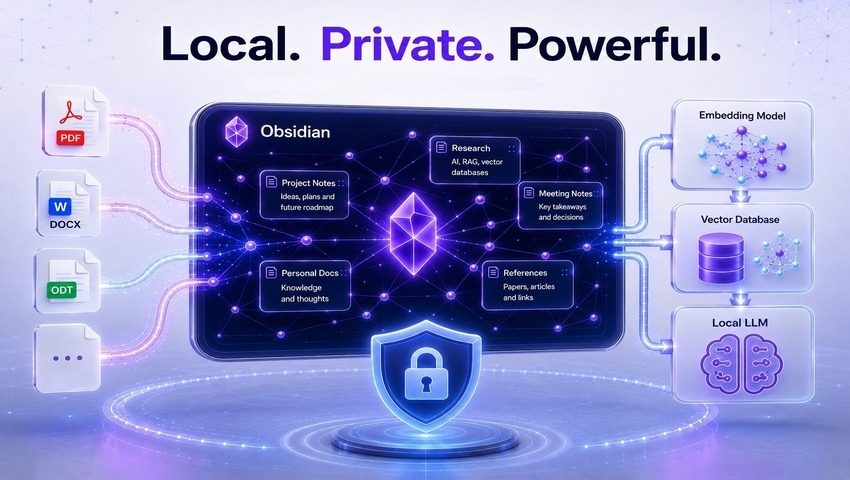
Obsidian + RAG: build your own ChatGPT
Knowledge bases, personal notes, technical documentation, and digital archives continue to grow over time. As they expand, finding the right information becomes increasingly difficult – even when everything is well organized. Traditional search relies on exact keywords, whereas modern workflows increasingly require semantic search, analysis of relationships between documents, and summarization of information from multiple sources.
This is exactly what Retrieval-Augmented Generation (RAG) enables. It allows large language models (LLMs) to work with your own knowledge base: find relevant information, use it as context, and generate responses based not on the model’s general knowledge, but on your documents.
One of the most effective platforms for building a local RAG system is Obsidian. With its local-first architecture, open Markdown format, and extensive plugin ecosystem, Obsidian provides an ideal foundation for creating a fully private AI solution that operates entirely on your own hardware, without sending sensitive information to cloud services.
Modern local RAG solutions extend well beyond Markdown notes. They support a wide variety of document formats, creating a unified semantic search layer across an entire knowledge base. This enables AI to analyze personal notes alongside technical documentation, books, research papers, and corporate documents while ensuring complete data privacy.
This approach is particularly valuable for professionals who regularly work with large volumes of information. Researchers and scientists can quickly locate relevant insights across thousands of academic papers without having to reread them. Lawyers, analysts, and consultants gain a secure way to work with confidential documents without relying on external AI services. Software developers can integrate local LLMs into their workflows to organize technical documentation, personal notes, and code-related knowledge. Meanwhile, Obsidian users can transform their vaults from passive repositories of information into intelligent knowledge assistants capable of uncovering hidden connections between notes and answering complex questions.
In this article, we’ll explore how to build a local RAG system based on Obsidian, review the tools available for implementing it, discuss how to process different document formats, compare embedding models and vector databases, and examine the architectural approaches that deliver the best retrieval and response generation performance.
Theoretical foundation and architectural paradigm of local RAG
Implementing RAG within an Obsidian environment is fundamentally based on the principle of data sovereignty. Unlike cloud-based solutions, a local RAG system performs every stage of the pipeline – from document parsing to vector search and response generation – directly on the user's hardware. This approach is particularly important for professionals working with confidential information, medical records, legal documentation, or intellectual property.
Architecturally, a local RAG system consists of several critical components whose interaction determines overall accuracy and performance. The first stage involves text extraction and data structuring, where Markdown notes, PDFs, and office documents are transformed into machine-readable text segments suitable for embedding models. The next step is semantic encoding, where textual content is converted into high-dimensional vector representations. For example, the BGE-M3 embedding model generates 1024-dimensional vectors capable of capturing not only keywords but also deep semantic relationships and contextual nuances.
The search for relevant information is based on calculating cosine similarity between the query vector and vectors in the database. Mathematically, this is expressed as the dot product of vectors $\mathbf{A}$ and $\mathbf{B}$ divided by the product of their norms:
$$\text{similarity} = \cos(\theta) = \frac{\sum_{i=1}^{n} A_i B_i}{\sqrt{\sum_{i=1}^{n} A_i^2} \sqrt{\sum_{i=1}^{n} B_i^2}}$$
This metric allows the system to find answers even when the query is phrased differently from the original text in the notes.
Comparison of architectural solutions for Local RAG
To choose the optimal strategy, available tools must be evaluated by performance, format support, and setup complexity.
| Tool | Indexing method | Supported formats | LLM engine | Complexity |
|---|---|---|---|---|
| Neural Composer | GraphRAG (LightRAG) | MD, PDF, DOCX | Ollama, Local Python | High |
| Smart Connections | Vector (HNSW) | MD, PDF (Pro), Images | Local/Cloud Embeddings | Low |
| AnythingLLM | Vector (LanceDB) | MD, PDF, DOCX, TXT | Ollama, Built-in | Medium |
| PrivateGPT | LlamaIndex | MD, PDF, DOCX, ODT (через CLI) | Local Python Stack | High |
| ObsidianRAG | Hybrid (Vector + BM25) | MD, Wikilinks | Ollama, LM Studio | Medium |
Processing Markdown notes. Obsidian’s structural advantage
Markdown is Obsidian’s native format, giving it a significant advantage when building RAG systems. However, simply reading the text is not enough for high-quality generation. An effective system must account for Obsidian’s specific topology, which includes wiki-links, tag hierarchies, and YAML frontmatter metadata.
Intelligent chunking strategies
Chunking – the process of splitting text into fragments – is the stage where the quality of future retrieval is established. Using fixed-size chunks (e.g., 512 tokens) often breaks logical connections. For Obsidian, the most effective strategy is heading-aware chunking. A chunk should correspond to one complete thought, usually bounded by second- or third-level headings (H2, H3).
The ideal system should implement the following principles:
- Preservation of heading context: Each text chunk should carry metadata about all higher-level headings. This allows the model to understand that a paragraph in the “Methodology” section relates to a specific project, even if the project name is not mentioned directly in the chunk.
- Wiki-link processing: Wiki-links are critical for GraphRAG. Plugins like Neural Composer or ObsidianRAG use these links to build a knowledge graph. This enables “one- or two-step” search, where answers are synthesized not only from the matched note but also from connected documents.
- Validation and filtering: Before indexing, remove fragments consisting mostly of whitespace or containing fewer than 50 characters to avoid “noise” in search results.
Metadata and semantic weight
YAML metadata enables filtering at the search stage. For example, status: archived can automatically exclude a note from the active RAG context, while type: MOC (Map of Content) can receive higher weight during ranking.
Complex document formats: PDF and OCR pipelines
Integrating PDF files into an Obsidian knowledge base is one of the biggest challenges due to the format’s focus on visual layout rather than structural logic. The Obsidian ecosystem offers three main approaches.
Direct extraction and full-text search
Plugins like Text Extractor use Tesseract.js to extract text. This provides basic search via the Omnisearch plugin but has significant limitations with multi-column layouts and complex tables.
A more modern approach uses specialized OCR services. For example, OCR Extractor can integrate with Mistral AI OCR, providing highly accurate extraction at approximately $2 per 1,000 pages. The extracted text is saved directly in Obsidian as an expanded Callout block under the PDF attachment, making the text accessible to the built-in search and local RAG engines without the need for re-parsing.
Deep annotation and PDF++
For research work, it is crucial not only to index the PDF but also to reference specific fragments. Plugins such as PDF++ and Annotator allow you to create “deep links” to specific pages and highlights. In RAG, this means the AI can generate a response and provide a direct link that opens the PDF exactly at the cited location.
Processing DOCX and ODT Documents
Unlike PDFs, Microsoft Word (DOCX) and OpenDocument Text (ODT) files require a different processing approach. Because they are built on structured XML, these formats preserve document semantics much better than PDFs. However, local parsing and indexing still present a number of technical challenges.
Technical aspects of DOCX parsing
Unlike PDF, DOCX is a ZIP archive containing word/document.xml. Modern parsers, such as LlamaParse, use this XML structure to accurately extract tables and nested lists. This approach avoids many of the formatting issues encountered when processing PDFs, where table borders are often blurred for recognition algorithms.
For local RAG implementations in Obsidian, DOCX support is typically provided either through external indexing services (such as the LightRAG server used by Neural Composer) or by converting documents to Markdown before indexing. Pandoc remains the gold standard for batch conversion of DOCX files into “clean” Markdown, which is significantly easier for local LLMs to process.
Challenges and solutions for ODT Files
The ODT format remains something of “a blind spot” for most Obsidian plugins. As of early 2026, neither Smart Connections nor Neural Composer provides native ODT support. As a result, users whose knowledge bases contain large collections of ODT documents must rely on external preprocessing tools.
One of the most effective local solutions is Jimmy (marph91/jimmy), an open-source utility specifically designed to convert ODT files into Markdown. Although LibreOffice 26.2 introduced a “Save as Markdown” feature, users frequently report formatting issues such as broken heading hierarchies and excessive bold formatting, both of which can negatively impact embedding quality. Using dedicated conversion tools or LiteParse, which automatically converts Office documents into PDFs via LibreOffice before parsing, provides a far more reliable preprocessing pipeline for RAG applications.
Using Binary File Manager
For users who prefer not to convert all files, the Binary File Manager plugin offers a metadata-based strategy. The plugin automatically creates a companion Markdown file for every detected binary document, including PDF, DOCX, and ODT files. These companion notes can contain descriptions, tags, and links. Although this approach does not provide full-text indexing for ODT documents, it allows the local RAG system to at least “be aware” of the document’s existence and find it based on its metadata.
Vector infrastructure and selection of local models
The performance of a RAG system in Obsidian directly depends on the chosen embedding model and vector database. For local deployments, video memory (VRAM) capacity and disk I/O performance are often limiting factors.
Comparison of embedding models for local use
The choice of embedding model determines both the dimensionality of the vector space and the multilingual capabilities of the system.
| Model | Parameters / dimension | Recommended hardware | Key features |
|---|---|---|---|
| BGE-M3 | 1024-dim | GPU (8GB+ VRAM) | Multimodal, supports 100+ languages, slow on CPU |
| Nomic-embed-text | 768-dim | CPU / GPU | Optimized for RAG, high indexing speed, long context window |
| BGE-micro-v2 | 384-dim | Any (even Raspberry Pi) | Minimal resource consumption, average accuracy |
For users running Apple Silicon (M1/M2/M3) or NVIDIA RTX GPUs, we recommend using nomic-embed-text through Ollama. It provides stable indexing performance even for large knowledge bases containing more than 10,000 notes, while avoiding the timeouts that often occur when using heavier models like BGE-M3 on mobile processors.
Vector databases: DuckDB vs. LanceDB
Local Obsidian plugins typically use built-in vector stores to avoid installing complex databases like Pinecone or Milvus.
- DuckDB with the VSS extension: Used in custom solutions and some plugins to efficiently store both note metadata and vector embeddings inside a single
.duckdbdatabase, making it possible to execute SQL queries that combine semantic search with tag filtering. - LanceDB: Used in AnythingLLM and Python-based architectures. It is optimized for working with large datasets stored directly on disk, making it particularly suitable for knowledge bases whose vector indexes no longer fit into system memory.
In-depth analysis of the toolset: Neural Composer and LightRAG
Neural Composer represents the pinnacle of RAG development for Obsidian in 2026. Its key differentiator is the use of LightRAG – a graph-based RAG system that, instead of simple similarity search, builds a complex graph of entities and relationships.
Knowledge graph construction mechanism
During folder indexing (including PDFs and DOCX files), Neural Composer uses an LLM to extract entities (e.g., “Project”, “Methodology”, “Author”) and determine the types of relationships between them (“causes”, “is based on”, “contradicts”). This enables the system to handle synthetic queries such as: “Compare time management approaches in the PDF documents with my own notes from last month.”
For high-quality graph extraction, models with at least 14B parameters are recommended (e.g., Qwen2.5 14B). Smaller models (3B-7B) often produce “noisy” graphs with unclear connections, which negates the advantages of the graph-based approach.
Optimization for large vaults (9000+ PDFs)
When working with extremely large document collections (e.g., 9000+ PDF files), standard Obsidian plugins can cause crashes due to memory limitations of the Electron process. Neural Composer solves this problem by offloading indexing to a separate Python process. This keeps the Obsidian interface responsive while the background server processes heavy files using CUDA on GPUs such as the RTX 3090. For users with mechanical hard drives (HDD), it is recommended to set MAX_PARALLEL_INSERT=1 in the plugin’s .env settings to avoid excessive disk load from constant sector-seeking operations.
External ecosystems: AnythingLLM and PrivateGPT
When the capabilities of built-in plugins are insufficient, users turn to external systems that can connect to the Obsidian folder as a data source.
AnythingLLM: a versatile local desktop solution
AnythingLLM offers the most user-friendly interface for those who prefer not to work with the terminal. It supports “workspaces” where you can combine Obsidian notes with YouTube video transcripts, web pages, and Word documents.
Key features of AnythingLLM for Obsidian:
- Automatic folder recognition: The ability to select an entire folder with subfolders for recursive indexing.
- Context window management: Users can manually set the number of context snippets passed to the model (typically 4-6 for the best balance between accuracy and noise).
- Hybrid mode: Uses the built-in LanceDB vector engine, which delivers high performance on standard hardware.
PrivateGPT: enterprise-grade privacy
PrivateGPT is built on LlamaIndex and is targeted at developers and organizations with strict security requirements. It supports complex ingestion pipelines (simple, batch, parallel), allowing maximum utilization of multi-core processors during initial knowledge base indexing.
PrivateGPT also stands out for its broad document format support. In addition to standard PDF and DOCX, it natively handles .epub, .ipynb, .json and .mbox. For ODT files, it uses the same mechanisms as plain text but allows custom loaders to be added via its Python interface when needed.
Modern techniques for improving relevance
In 2026, RAG effectiveness is determined not only by retrieval but also by pre- and post-processing stages.
Local reranking
Semantic search often returns fragments that are mathematically similar but contextually irrelevant. Implementing a local reranker, such as BAAI/bge-reranker-v2-m3, significantly improves the quality of responses. The system first retrieves 20-50 candidates using fast vector search, then applies a heavier model for precise ranking. This adds only 100-500 ms to response time but dramatically reduces hallucinations.
Source citation and “Open in Obsidian” loop
For professional use, a RAG system must provide evidence for its claims. The best implementations (e.g., Vault RAG or EZRAG) include direct links to sources in the AI’s response. Using the Obsidian URI protocol (obsidian://open?vault=...&file=...), the chatbot’s answers become interactive: clicking a citation instantly opens the relevant note or document in Obsidian, turning the AI from a simple text generator into a powerful knowledge base navigation tool.
Hybrid Search
Combining vector similarity (60%) with keyword search via the BM25 algorithm (40%) makes the system more flexible. Vector search finds ideas, while BM25 ensures that specific terms, abbreviations, or proper names not present in the embedding model’s vocabulary are still found.
Hardware requirements and performance
Local RAG places high demands on PC components. For comfortable work with a knowledge base containing a large number of binary documents, the following configurations are recommended:
| Component | Minimum requirements | Recommended (professional) | Impact on RAG |
|---|---|---|---|
| RAM | 8 GB | 32 GB+ | Storing vector index and LLM in memory |
| GPU (VRAM) | 6 GB | 16 GB - 24 GB (RTX 3090/4090) | Speed of generation and graph extraction |
| Storage | SATA SSD | NVMe SSD | Text indexing and retrieval speed |
| CPU | 4-core (Modern) | 8-core+ (M3 Pro / Intel i7) | Document parsing and background processes |
Using Apple Silicon is particularly advantageous due to Unified Memory, which allows running large models (14B-20B parameters) even on laptops where traditional discrete GPUs would be limited to 8 GB VRAM.
Conclusions and recommendations
Building a local RAG system based on Obsidian is a multi-layered task, the success of which depends on the quality of data preparation. For Markdown notes, implementing graph structures that reflect the intellectual topology of the knowledge base is critical. When working with PDFs, tools that support visual context and deep links should be prioritized to ensure the verifiability of AI responses.
Processing DOCX and ODT formats remains the most labor-intensive part of the pipeline, requiring either advanced XML parsers or batch conversion to Markdown beforehand. The most promising solution in 2026 is using LightRAG-based plugins (such as Neural Composer), which combine vector proximity with the power of knowledge graphs.
For professional users, we recommend:
- Standardization of chunking: Use fragments of approximately 2,000 characters with 15% overlap and mandatory preservation of the heading hierarchy.
- Model hierarchy: Use lightweight models for embeddings (Nomic) and powerful models for generation and reranking (Qwen/Llama 14B+).
- Hybrid strategy: Use Obsidian as the primary interface, but engage external systems like AnythingLLM when needed for initial processing of massive binary data arrays.
Implementing these technologies transforms Obsidian from a passive digital archive into a full-fledged intellectual partner capable of deep analysis and synthesis of personal knowledge in a completely private mode.
Oleksandr Slavinskyi
Frequently asked questions (FAQ)
1. Is it safe to use local RAG for confidential data? Yes, this is one of the main advantages of local RAG. Since the entire architecture – from the vector database to the language model – runs exclusively on your own hardware, no data is sent to external servers or cloud APIs. You retain full sovereignty over your information.
2. Do I need powerful hardware for this system? It depends on your tasks. For basic work with notes, a modern processor and 8-16 GB of RAM are sufficient. However, for comfortable indexing of large archives (9000+ PDFs) and working with graph structures (GraphRAG), a graphics card with 16 GB+ VRAM (such as the RTX 3090/4090 series) or Apple Silicon devices with unified memory is recommended.
3. What is the main difference between vector search and GraphRAG? Standard vector search looks for information based on contextual “similarity,” while GraphRAG builds a map of relationships between entities. This allows the AI not only to return text fragments but to actually “understand” how different topics, authors, or projects are connected within your knowledge base.
4. Which document formats are supported best? Markdown is Obsidian’s native format, so it is indexed the fastest and most accurately. PDF, DOCX, and ODT require preprocessing – text extraction or conversion – so the system can “read” them without formatting errors.
5. What should I do if the system slows down during indexing of a large database? When working with very large vaults, it is important to move the indexing process to a separate background Python process so it doesn’t block the main Obsidian interface. You can also limit operation parallelism (MAX_PARALLEL_INSERT=1) to reduce load on the disk.